
Five Video Edits, One Re-encode: Cutting a Clip in Half Saved 8%
Trimmer, splitter, cropper, flip and merger all record a new file instead of editing the old one. That makes the math strange: remove half the clip and the file barely moves, remove 44% of the pixels and it grows.

What these five tools actually do
None of them edits a file. Each tool plays your clip, captures the picture it just drew, and encodes that into a new WebM. The page notes say it plainly: the trimmer warns that a 30 second selection takes about 30 seconds to record, and the splitter says the split is re-encoded and may not be frame-accurate.
That single fact decides everything below. The size of the output is not a function of how much you removed; it is a function of how the browser's encoder treated whatever was left. A cut is a re-record, not a subtraction.
One clip, six files
The source is one 10.08 second MP4 of 1,728,700 bytes (1.65 MB, 720 × 1280). Every number below was read from the produced file, not from the on-page badge that rounds to two decimals.
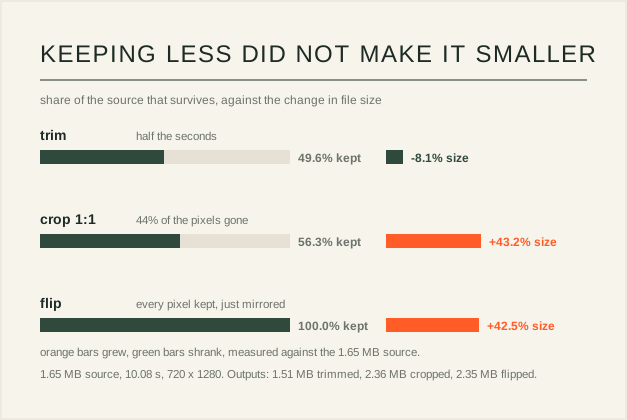
Trim 0 to 5 s: 1,588,209 bytes (1.51 MB), so half the duration gave up 8.1% of the bytes. Split at 5 s: 1,466,092 plus 1,565,985 bytes, 3,032,077 bytes together — one clip became two files 75% heavier than the original. Crop to 1:1: 720 × 720, 2,474,531 bytes (+43.2%) while the pixel count fell 43.75%. Flip horizontal: 720 × 1280, 2,463,529 bytes (+42.5%) with the pixel count unchanged. Merge the two split parts: 3,653,157 bytes of input came back as 2,681,621 bytes, 26.6% smaller.
Why cutting it in half saved almost nothing
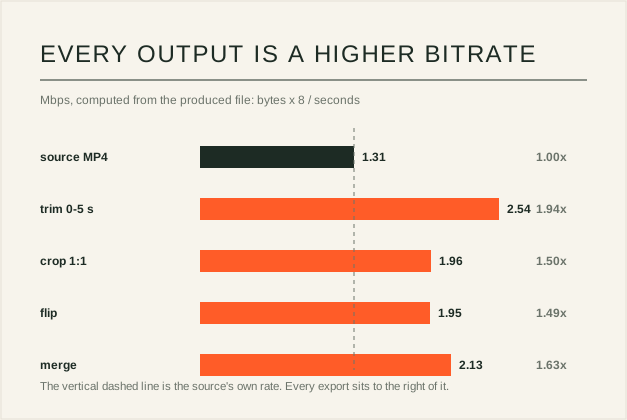
Divide each output by its own duration and the reason appears: the source runs at 1.31 Mbps, while the trim runs at 2.54, the crop at 1.96, the flip at 1.95 and the merge at 2.13. Every export is encoded at a higher rate than the file it came from, so removing content removes bytes only at the margin.
The merge is the same mechanism seen from the other side. Two separately recorded parts had two sets of encoder overhead and two canvas sizes; merged into one stream at 720 × 1080 they share it, and the result is 26.6% under the sum. Nothing was deleted there — the saving came from recording once instead of twice.
What each edit changes, and what it costs
Trimmer keeps a range and drops the rest, at a cost equal to the length you keep. Splitter gives you both sides of one point, and each side is encoded separately, which is why the pair outweighs the original. Cropper cuts a centred rectangle — it does not stretch, so a 720 × 1280 clip cropped to 1:1 loses the top and bottom, and the page says manual drag selection is not included. Flip mirrors left to right or top to bottom, and any on-screen text will read backwards. Merger plays clips in sequence into a single canvas, fitting each one without cropping, mixing audio when the browser exposes it.
The practical rule: these tools change what the frame looks like or which seconds survive, and they never promise a smaller file. If the goal is a smaller file, compress it; if the goal is a different shape, cut it.
Five checks before you export
One: budget the time. Export equals playback, so a ten second clip costs ten to twelve seconds and a five minute clip costs five minutes. Two: never treat cropping or splitting as compression — the measurements here show the opposite. Three: if you need frame-accurate cuts, the splitter's own note says it may not deliver them. Four: look at the crop before committing, because a centred rectangle decides for you which edge content dies. Five: output is WebM; a platform that demands MP4 means one more conversion, which is one more re-encode.
Quick answers
Why did the file get bigger when I cropped it?
Because the tool does not shrink the file, it re-records it. The export is a fresh real-time capture at a canvas decided by the crop ratio, and its bitrate settles where the browser's encoder puts it — higher than the source in all five tests here. Removing pixels changes the picture, not the encoding rate.
Do these tools stretch or distort the video?
No. Cropping removes outer areas of the frame and keeps the centre; merging fits each clip inside one canvas without cropping. Stretching is a different operation, and none of these tools performs it.
Can I change only the metadata without re-encoding?
Not in the browser. There is no metadata-only path in these tools: each one plays the clip and records the output, so a full re-encode is the price of any edit. That is why the bitrate table matters more than the byte count.
Related reading
USE IT IN FRAMIVOO
Trim a clip in the browser ↗