
Video Codec Comparison: H.264, H.265, VP9 and AV1
A practical comparison of the four codecs creators meet most: compatibility, file size, licensing and encode time, plus which one to export for upload.

A codec is not a container
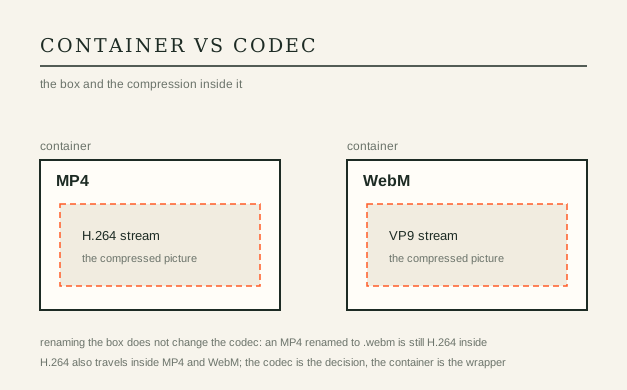
A container such as MP4 or WebM is the box; a codec is the method used to compress the picture inside it. Both H.264 and H.265 usually travel in MP4, while VP9 and AV1 usually travel in WebM. That is why two files with the same extension can behave completely differently: the extension tells you the box, not the compressor. Inspect the codec, not the filename, before you conclude anything about compatibility.
The four codecs creators meet
Nearly every file you upload or edit is one of these four. Newer codecs spend fewer bits for the same visible quality, which is why a newer one can look identical at a much smaller size — and why older hardware sometimes cannot decode it smoothly.
| Codec | Typical container | Compatibility | Relative size | When to choose |
|---|---|---|---|---|
| H.264 / AVC | MP4, MOV | Universal | Largest | Uploads, sharing, anything that must play everywhere |
| H.265 / HEVC | MP4, MOV | Uneven in browsers | Smaller | Phone and camera footage, local archives |
| VP9 | WebM, MP4 | Strong in browsers | Small | Web delivery where you control the player |
| AV1 | WebM, MP4 | Growing | Smallest | Archives and forward-looking delivery, when encode time allows |
Compatibility versus size
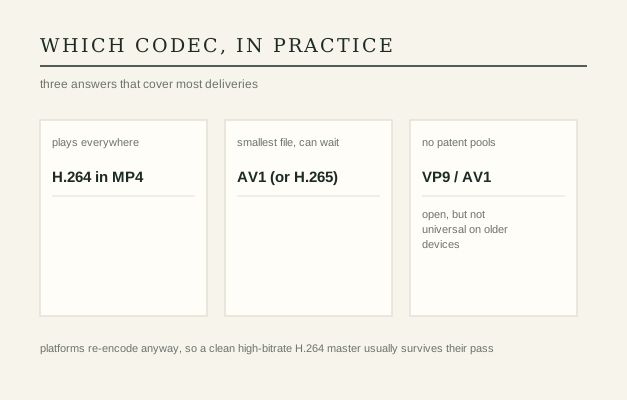
H.264 is the safest choice. It plays in essentially every browser, phone, TV and editor, and it decodes on old hardware without effort. Its disadvantage is size: at the same visible quality it produces the largest files of the four.
H.265 (HEVC) is noticeably more efficient, which is why phones and cameras record in it. Playback is the problem: browser support is uneven, and some editors charge for it. Fine for local archives and device footage, risky as the only copy of something you must publish.
VP9 is royalty-free and well supported in browsers and on YouTube, which has used it for years. It is a good middle ground for web delivery when you can control the player. AV1 is the newest and the most efficient, royalty-free, with growing hardware decode — but encoding is slower and support on older devices is still thin.
If you cannot decide, export H.264. A file that plays everywhere beats a smaller file that some viewers cannot open.
Licensing in plain terms
H.264 and H.265 sit inside patent pools: using them can involve royalties depending on who you are and what you ship, which is why some tools and browsers handle HEVC reluctantly. VP9 and AV1 were designed royalty-free by design, so software support spreads without licensing friction. For a creator uploading to a platform, this rarely costs you money directly, but it does explain why support is uneven and why “just use the smallest file” is not always the practical answer.
Encode time and hardware
Efficiency has a price. Encoding AV1 in software can take several times longer than H.264 for the same clip, and H.265 is slower than H.264 as well. Hardware encoders and decoders narrow the gap on newer chips, but a five-year-old phone may decode AV1 in software or not at all. Practical rule: encode with the newest codec your audience can actually play, and check the result on a second device before you ship it.
Quick answers
Does changing the file extension change the codec?
No. Renaming an MP4 to WebM leaves the H.264 stream untouched, and some players will refuse it. The codec has to be re-encoded, not relabelled.
Which codec should I upload to YouTube or TikTok?
H.264 in MP4 is the least risky. Platforms re-encode anyway, so a clean, high-bitrate H.264 master usually survives their pipeline better than an unusual codec.
Why does my HEVC file not play in a browser?
Because browser and OS support for HEVC is uneven, and some builds ship without a decoder. Re-encode to H.264 for anything that must play in a browser tab.
Is AV1 worth it yet?
For archives and for delivery where you control playback, yes. For a file that must open on any device today, H.264 still wins on reliability.
USE IT IN FRAMIVOO