
What "Your Files Stay on Your Device" Actually Means
Every tool page carries the same line: files are processed locally and never uploaded. That is a factual claim, so it can be tested. I recorded the network while a tool did its work, and separately counted every resource reference on every page in the archive.

What the sentence promises
The claim is narrow and specific: the file you pick is read by the page, re-encoded by the page, and handed back as a download. It is not sent to a server, and no copy of it is stored anywhere outside your machine.
That is different from "we do not sell your data" or "we respect your privacy", which are promises about intent. This one is a statement about plumbing, and plumbing can be observed.
One pass through the pipeline
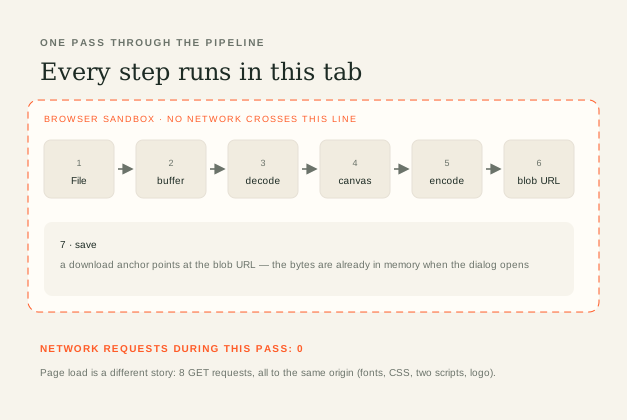
A browser tool touches a file in seven places. The page receives a File object from your picker. It reads it into memory as an ArrayBuffer. The browser's own decoders turn that into pixels — a canvas for images, a media element for video and audio. Then an encoder writes a new stream, the result becomes a Blob, and the save button points at a temporary blob: URL that only this tab can resolve.
The important detail is the last one. By the time you click download, the output already exists in memory. The save dialog is a local file write, not a fetch. Nothing in that chain needs a server, which is why the tools can work with the network switched off.
What the network recorded
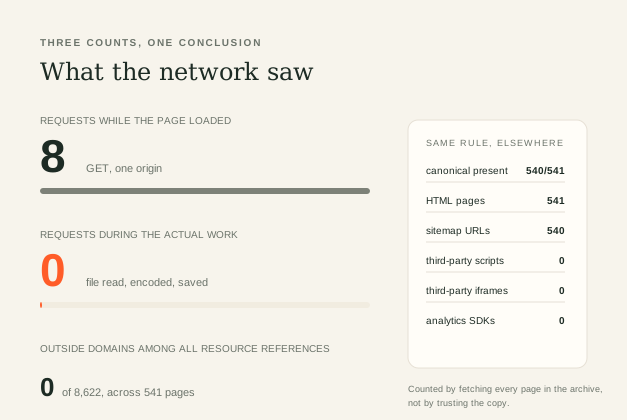
Two measurements, one instrument. First the page: loading the image compressor produced 8 requests, all GET, all to a single origin — fonts, a stylesheet, two scripts and the logo. No analytics domain, no font CDN, no third-party anything.
Then the work: with the request log cleared, I fed it a 1600 × 1000 PNG and ran a WebP conversion. The status line went from 1 / 1 to Ready to download and the summary read 1 × WEBP · 29 KB. Requests during that pass: 0.
Second instrument, different question: does anything on the site call out to another domain at all? Fetching every page in the archive and reading all src and href attributes gave 8,622 resource references across 541 pages, resolving to one domain. Zero third-party scripts, zero third-party iframes, zero analytics SDKs.
Three things it does not prove
Honest boundaries matter more than the headline. Not proof of offline use. The page itself is downloaded from a server, so the first visit needs the network. What is local is your file, not the site.
Not proof about your browser. Extensions with permission to read page data can see what a page sees, and browsers and operating systems keep their own diagnostics. Those are outside any site's control.
Not proof about the host. A static host still sees a request for each file it serves, with an IP address and a timestamp in its logs — the difference is that a log entry for tool.js says nothing about your image, because your image was never part of a request.
How to check it yourself
Open the tool, open developer tools, switch to the Network tab and clear it. Pick a file and run the tool. If the claim holds, the list stays empty until you click download.
The stronger version: turn off your network after the page has loaded, then process a file. A local tool does not notice. An upload tool cannot finish. That single test separates the two designs faster than any policy page.
Quick answers
If nothing is uploaded, why does the page still need a server?
Because the page itself has to arrive. HTML, CSS, scripts and fonts are downloaded once per visit. Your files are what never travel — the site's own files do.
Does local processing mean the result is identical to a desktop encoder?
No. The browser encoder is fast and decent, not best-in-class. Local processing decides where the work happens, not how good the output is; a desktop tool with tuned settings can still produce a smaller or cleaner file.
Can a site claim this and still upload files?
It could, and that is precisely why the claim should be checked rather than trusted. The check is cheap: one network tab and one file.
Related reading
USE IT IN FRAMIVOO
Try it with the network off ↗